MyDigiRecords
by MyDigiRecords
MDR offers a 30-day free trial with full access to the entire app, allowing Medicare beneficiaries to evaluate all features before subscribing.
Platforms: iOS Web Android
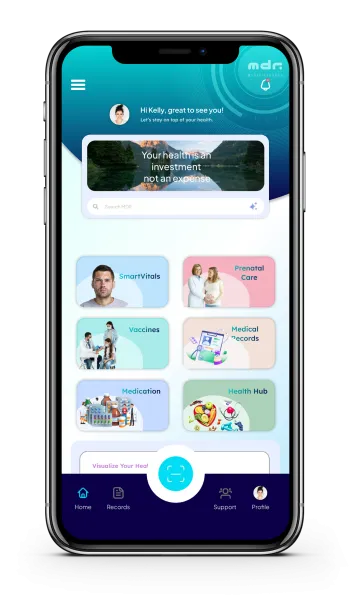
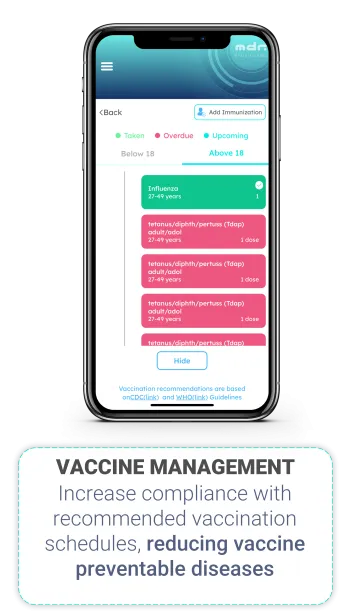
MyDigiRecords (MDR) is a HIPAA-compliant personal health record app connecting individuals and families to their own health information, including Medicare data, in one secure platform. MDR is DirectTrust CARIN-CFA accredited, uses ID.me for identity verification, and connects via TEFCA through a CMS-aligned QHIN. Organize medical history, track vaccinations, manage medications, and share records with caregivers or providers, with full control over your data.
Key Features
-
Manage your health records
MyDigiRecords lets users store, organize, and manage their complete health records, and those of family members, in one secure application. Records can be entered directly, imported from connected EHR systems like Epic, Oracle Health, and Apex Health, or retrieved through KONZA, a CMS-aligned QHIN, without requiring separate portal logins for each provider. This gives users a single, longitudinal view of their health history instead of fragmented records scattered across different offices and systems.
-
Use AI to get insights on your health
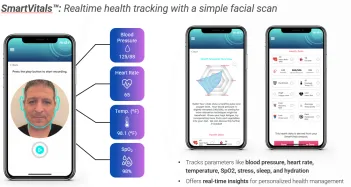
MDR uses AI in two ways to help users understand their health. Medication interaction analysis reviews a user's logged medications and flags potential interactions. SmartVitals uses a contactless facial scan, processed in the cloud, to estimate wellness indicators such as heart rate, blood pressure, temperature, and SpO2, generating a personalized wellness snapshot. AI-generated content is clearly labeled within the app, and every relevant screen includes a disclaimer that this information does not replace medical advice.
-
Track medication
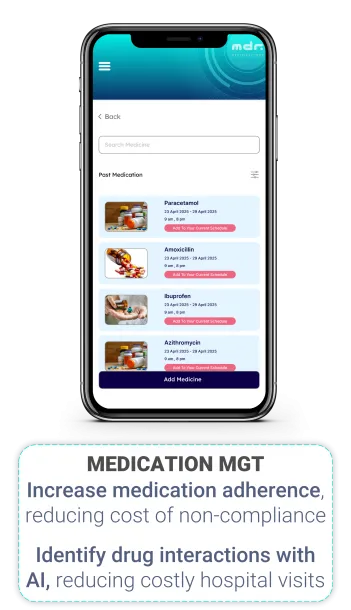
MDR helps users manage current and past medications in one application, including dosage, schedule, and duration. Users can add new medications, view medication history, and get AI-powered alerts for potential drug interactions to reduce risk. This supports medication adherence and gives caregivers visibility into what a family member is currently taking.
-
Share information with caregivers or providers
Users can securely share health records with family caregivers, schools, employers, or providers directly from the app. MDR supports sharing via Smart Health Links and QR codes, letting a user control what information is shared, with whom, and for how long, without requiring a provider portal login to send or receive it. This makes it easy to coordinate care across a household or provide accurate information at a new provider visit without manually gathering paperwork.
-
Work offline
MDR is built to work without a reliable internet connection, allowing users to view, add, and edit health records and medications while offline. Once the device reconnects, changes automatically sync to keep records up to date across devices. The one exception is SmartVitals, which requires connectivity since facialscan analysis is processed in the cloud.
Screenshots